
Create or Edit Video in Google Vids
Ever notice how easy it is to overlook something new on a screen you see every day? Take the Google App Launcher—that familiar nine-dot square in the upper-right corner of Gmail, Calendar, and Drive. It scrolls across multiple screens, and new things are added to it periodically.

A new tool you may have missed is Google Vids. It lets you create or edit videos easily in your browser without installing another piece of software. Its AI-powered features can help you design class, training, and informational videos without needing to learn advanced and involved video skills.
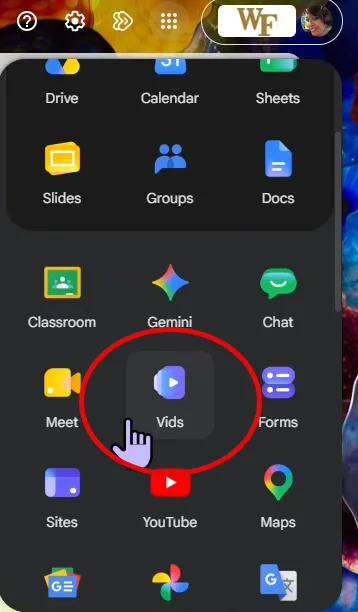
Click on the Vids app in the app launcher to access the welcome screen.
The welcome screen offers several ways to get started with Google Vids. Your first step is to choose your preferred video orientation by clicking on Landscape, Portrait, or Square.
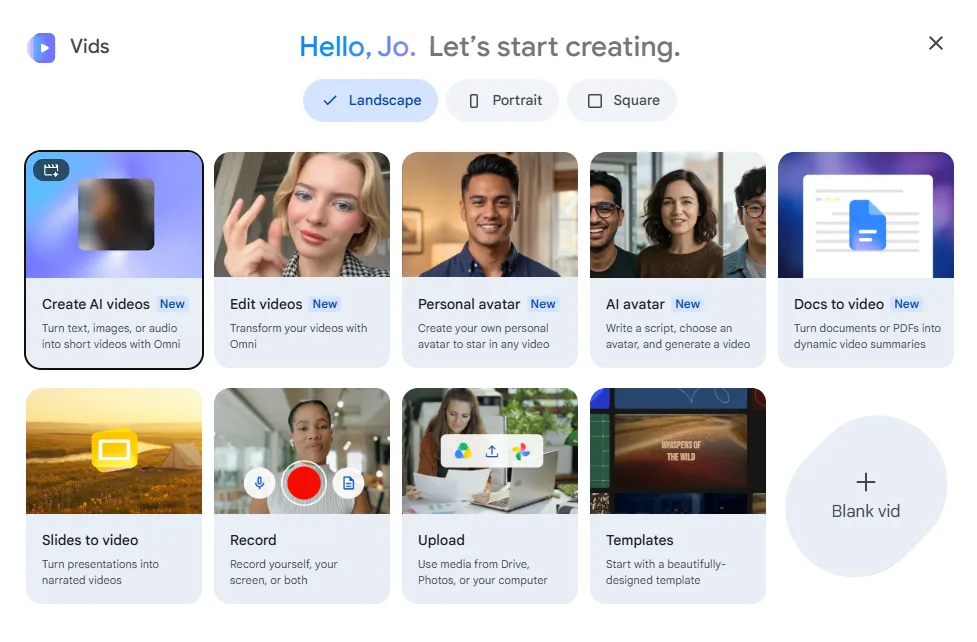
Then decide which option is your preferred starting point.:
- Create AI videos: Turn text, images, or audio into short videos
- Edit Videos: Transform your own videos
- Personal avatar: Create your own personal avatar to star in any video
- AI avatar: Write a script, choose an avatar, and generate a video
- Docs to Video: Turn documents or PDFs into dynamic video summaries
- Slides to video: Turn presentations into narrated videos
- Record: Record yourself, your screen, or both
- Upload: Use media from Drive, Photos, or your computer
- Templates: Start with a beautifully designed template
- Blank vid: Be creative and start with a blank canvas
Google Vids is a great alternative to traditional video editing software, especially for those who want to create professional-looking videos without the steep learning curve. Whether you’re developing course materials, creating training tutorials, sharing departmental news, or simply trying something new, Google Vids makes video creation more accessible and less intimidating.
So, the next time you need to make a video, open your Google App Launcher and give Vids a try. You might be surprised at what you can create!
If you need help getting started or exploring how Google Vids can support your teaching and projects, you have a couple of options. One is Google’s Getting Started with Vids materials. Another is to contact your Instructional Technologist for a consultation. We’re always happy to help!