
Tech Tip: Meet Ollama — AI That Lives on Your Computer
You have probably heard quite a bit about artificial intelligence lately.
This is because artificial intelligence is currently being added to everything, including word processors, search engines, phones, refrigerators, and presumably, by the time you finish reading this, your toaster.
Most of the AI tools you hear about—ChatGPT, Claude, Gemini, and their many relatives—run “in the cloud.” This sounds peaceful and environmentally friendly, as though your question is gently carried upward by woodland birds.
What it really means is: your question is sent to somebody else’s computer!
There is also a less glamorous reason to run AI locally: your questions do not automatically have to leave your computer and take up residence on somebody else’s server. This is comforting when you need to ask things like, “If I accidentally hit Reply All, can I legally change my name and move to another state?” or “How long can a leftover burrito remain in the office refrigerator before it becomes a federally protected life-form?” With a local model, these important inquiries can stay where they belong: on your laptop, quietly judging you in private.
Let’s explore another option.
It’s called Ollama, and it lets you run an AI language model directly on your own Windows PC or Mac.
Yes, your computer can have its very own AI.
There is no indication that this will cause it to become self-aware, seize control of your printer, and demand a parking permit.
So far.
What Exactly Is Ollama?
Ollama is a free program that lets you download and run large language models, usually called LLMs, on your own computer.
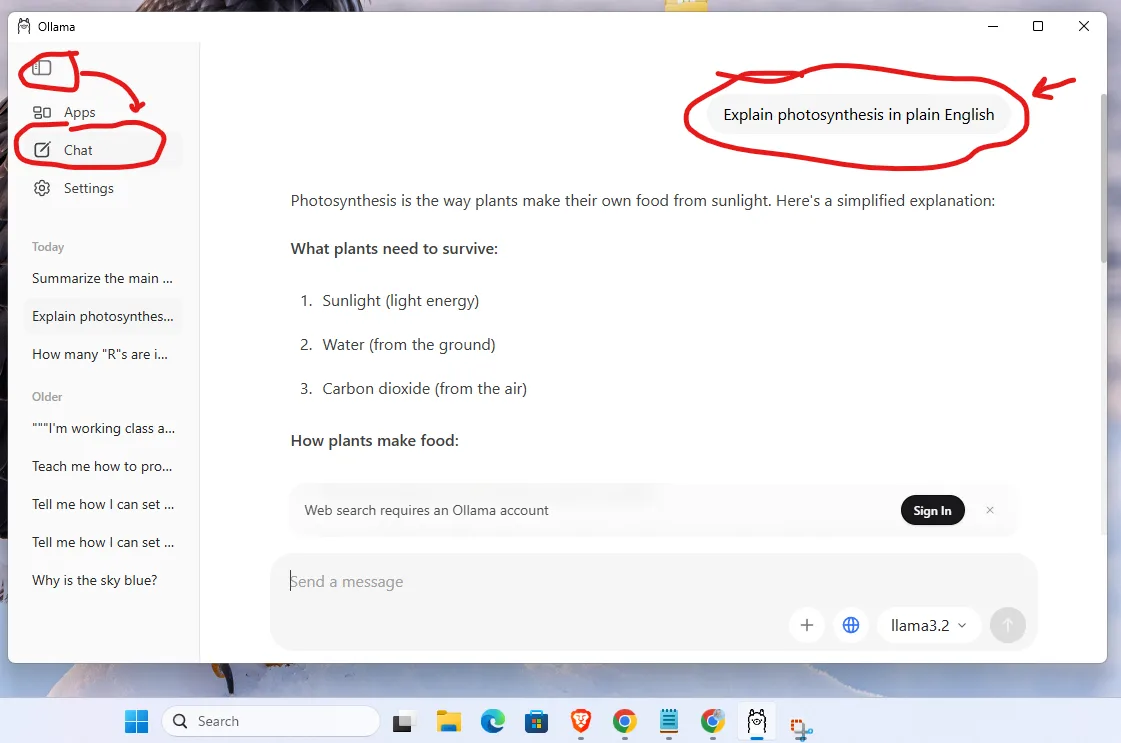
An LLM is the technology behind modern AI chat systems. You type something such as:
“Explain photosynthesis in plain English.”
and the model attempts to answer.
You can also ask:
“Rewrite this email so it sounds friendly and professional.”
This is particularly useful when the original email begins:
“As I have already explained three times…”
You can use an AI model to brainstorm ideas, summarize information, explain unfamiliar concepts, work with documents, help with writing, or answer questions.
The important difference with Ollama is that the AI model can run locally on your computer, rather than requiring every interaction to be processed by a commercial AI service somewhere on the Internet.
Here is a simple conversation example:
“Explain photosynthesis in plain English.”
Getting Started Without Becoming a Computer Scientist
Ollama is available for both Windows and macOS.
Go to ollama.com, download the appropriate version, and install it like a normal application.
When you open Ollama, you can select an AI model and begin chatting with it.
This leads naturally to the next question:
What is a model?
Think of Ollama as the application and the model as the particular AI brain you choose to put inside it.
This analogy should not be examined too closely.
There are many models available, with names such as Llama, Gemma, Qwen, and Phi. There are also increasingly large numbers attached to their names, which can make choosing one feel like purchasing motor oil.
For an ordinary computer with 16 GB of memory and no special graphics card, start small.
Good beginner choices include:
- Llama 3.2 3B — a good general-purpose starting model.
- Gemma 3 4B — another small, capable model that can also work with images in supported configurations.
- Phi-4 Mini — designed to provide useful capabilities without requiring a computer normally used to calculate weather systems.
You do not need to begin with the largest model available.
Large models can produce impressive results, but on an ordinary computer they may also give you enough time between words to make coffee, drink the coffee, wash the cup, and reconsider whether you really needed to know the answer.
Three Things to Try
Once you have a model running, you do not need to learn special computer commands.
Just type ordinary sentences.
Try:
1. “Explain this concept in plain English: photosynthesis.”
This is useful for getting a quick explanation of an unfamiliar subject—or discovering how convincingly an AI can explain something you already know.
2. “Rewrite this email to be shorter, friendlier, and more professional.”
Then paste in some text.
This can be extremely useful for faculty and staff because email occasionally causes otherwise reasonable adults to produce seven-paragraph messages concerning the location of a stapler.
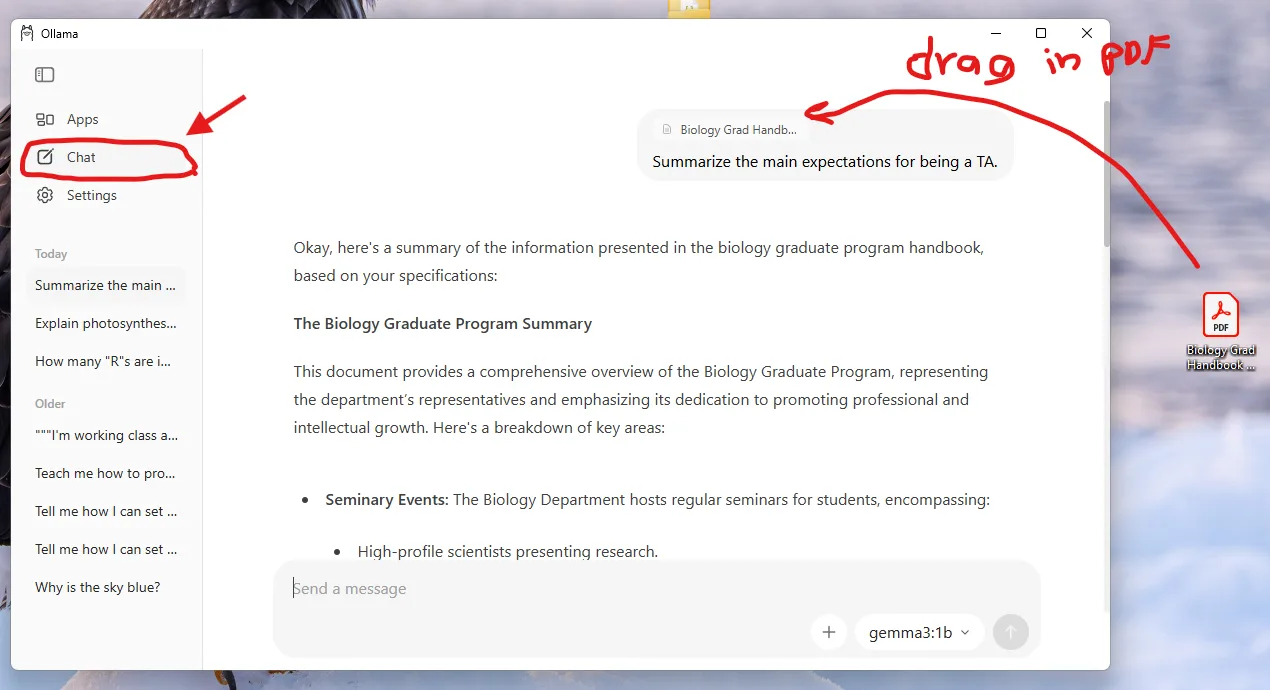
3. “Summarize this document in five bullet points and give me three questions I should ask about it.”
With models and versions that support document input, you can add a document and ask the AI to help you understand it.
This does not eliminate the need to read important documents.
But it may tell you which 47-page report contains the paragraph you actually care about.
Prompt:
(Drag-and-Drop the PDF document into the interface.)
“Summarize the main expectations for being a TA?”
A Few Important Warnings
Running the AI on your own computer does not make the AI automatically correct.
Language models sometimes make mistakes.
More impressively, they can make mistakes with enormous confidence.
An AI may provide an answer that is beautifully written, clearly organized, professionally formatted, and completely wrong. Seriously!!
Those of you who work in higher education will recognize that this is not an entirely new phenomenon.
So verify important facts, citations, quotations, calculations, and other information before using AI-generated material in teaching, research, publications, or university work.
Also follow university policies concerning sensitive, confidential, student, research, or institutional information.
Why Bother Running AI Locally?
Ollama provides an unusually easy way to experiment with AI while learning a little about what these models actually are.
You can try different models.
You can see how smaller and larger models behave.
You can experiment without necessarily depending on a web-based AI service for every interaction.
And you may discover that a surprisingly capable AI model can run on the same computer you currently use for email, web browsing, spreadsheets, and searching for the document that you are absolutely certain you saved somewhere.
If you have been curious about AI but assumed that running it yourself required Linux, a server room, and somebody named Trevor who understands CUDA, Ollama is a very approachable place to start.
Install it.
Choose a small model.
Ask it something.
For example:
“Is a hot dog a sandwich?”
Then watch several billion carefully trained parameters confront one of humanity’s most important unresolved questions.
Categories: Tech Tip